Smart Label Printer 120/220
Technical Specification
Revised March 31, 1998
Part Number 22-70030-01
Contents
8. Description of "Immediate" Commands
9. Description of "Buffered" Commands
14. Plug and Play Compatibility
15. (this section is intentionally blank)
This document describes the general operation of the Smart Label Printer and the interface between the printer and a host computer system. Smart Label Printer (or SLP) is a generic name for a family of printer models, including the Smart Label Printer 120 and Smart Label Printer 220, and is used in this document when the context is applicable to all models. When the context applies to only one specific model, the term SLP 120 or SLP 220 will be used, as appropriate. The document also contains some references to the SLP Pro (an earlier model of SLP) which are intended for developers that wish to make software that is backward compatible with that model.
The Smart Label Printer, or SLP, is a very small printer which is dedicated to printing labels. It is actually a bitmapped device that prints all information on the label (including text) as graphic images. The command set is very lean in order to allow the printer to concentrate only on printing and off-load the other functions to the host.
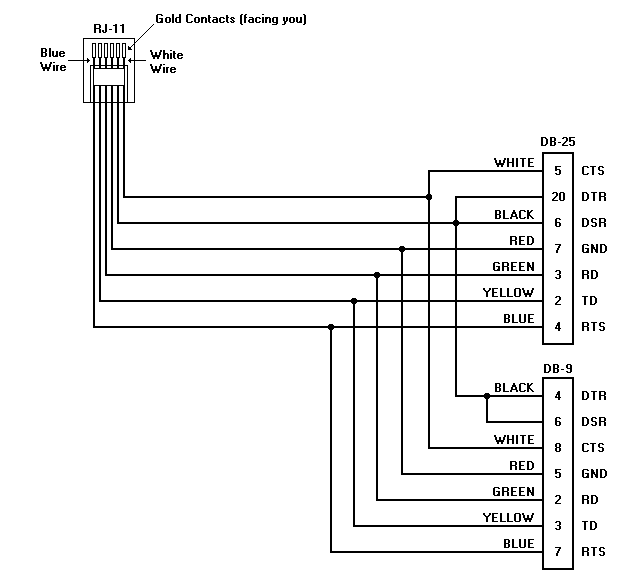
The SLP communicates with the host computer over a serial (RS-232) line. The supplied cable connects the GND, TX, RX, RTS, CTS, and DSR signals to the printer via a standard RJ11 type (modular telephone) connector. The host end of the cable is intended for DTE connections using either DB-25 or DB-9 connectors. At power-up, the printer’s serial communications port is normally configured for 9600 baud, no parity, 8 data bits, and one stop bit. The default baud rate is set by a jumper in the printer.
The host may change the baud rate to other values by sending a special command to the printer. However, the data format is always 8 data bits, one stop bit, and no parity. The printer's port is always set to the default baud rate after power-up and after receiving a reset command.
The primary communication flow is from the host to the SLP. This is because the host must send commands and data, while the SLP sends only XON/XOFF handshaking and an occasional status byte.
The SLP sends a status byte (unsolicited) to the host computer whenever there is a change in its internal copy of the status byte. A status byte can also be requested by sending the CMD_STATUS command to the SLP. Since the status byte is sent automatically whenever it changes, the CMD_STATUS command rarely needs to be used. After the printer is reset (whether by power-up or command), it will send a status byte, followed by an XON character, and then set the RTS signal high.
The SLP's input buffer has a capacity of 256 bytes.
When the input buffer is almost full (less than 32 bytes free), the printer will indicate a "buffer full" condition by sending an XOFF character (13h) to the host and setting the RTS signal low.
After the "buffer full" condition has occurred and the input buffer has been emptied to the point where there are only 100 bytes of data remaining in the buffer, the printer will send an XON character (11h) to the host and set the RTS signal high.
Note: The default thresholds for buffer full (32 bytes) and buffer empty (100 bytes) may be changed with the CMD_XOFF_THRESH and CMD_XON_THRESH commands.
The standard serial interface cable for the SLP is a six-conductor cable with an RJ11 connector (for the SLP) at one end and an appropriate connector for the host (DB-25 or DB-9 for IBM PC compatibles) on the other end.
The SLP serial interface cable for the PC is wired as follows:
|
SLP |
Wire |
|
PC Host |
||||
|
Signal |
RJ-11 |
Color |
Direction |
Signal |
DB-9F |
DB-25F |
|
|
RD |
2 |
Yellow |
ï |
TD |
3 |
2 |
|
|
TD |
3 |
Green |
ð |
RD |
2 |
3 |
|
|
CTS |
1 |
Blue |
ï |
RTS |
7 |
4 |
|
|
RTS |
6 |
White |
ð |
CTS |
8 |
5 |
|
|
GND |
4 |
Red |
ó |
GND |
5 |
7 |
|
|
DSR |
5 |
Black |
ï |
DSR, DTR |
6, 4 |
6, 20 |
|
|
|
|
|
|
|
|
|
|
The following commands are recognized by the SLP, and are compatible with the SLP Pro:
|
MNEMONIC |
B/I |
HEX CODE |
DESCRIPTION |
|
CMD_NOP |
I |
00 |
No operation |
|
CMD_STATUS |
I |
01 |
Request printer status |
|
CMD_VERSION |
I |
02 |
Request firmware version |
|
CMD_BAUDRATE |
I |
03 nn |
Change baud rate to nn |
|
CMD_PRINT |
B |
04 nn dd ... |
Print literal (binary) data |
|
CMD_PRINTRLE |
B |
05 nn dd ... |
Print compressed (RLE) data |
|
CMD_MARGIN |
B |
06 nn |
Image offset (in mm) from left side |
|
|
|
07 |
(reserved) |
|
|
|
08 |
(reserved) |
|
CMD_TAB |
B |
09 nn |
Tab nn dots to the right |
|
CMD_LINEFEED |
B |
0A |
Feed label one line (one dot) |
|
CMD_VERTTAB |
B |
0B nn |
Feed label nn lines (dots) |
|
CMD_FORMFEED |
B |
0C |
Feed to top of next label |
|
|
|
0D |
(reserved) |
|
CMD_DENSITY |
B |
0E nn |
Set print density to nn |
|
CMD_RESET |
I |
0F |
Reset printer |
|
CMD_CHECK |
I |
A5 |
Check for correct baud rate |
Notes: The B/I column specifies whether the command is Buffered or Immediate
"nn" represents a single byte parameter
"dd ..." represents a string of data bytes (length = nn)
These additional commands are specific to the SLP 120 and SLP 220:
|
MNEMONIC |
B/I |
HEX CODE |
DESCRIPTION |
|
CMD_CHECKPOINT |
B |
10 |
Send checkpoint response |
|
CMD_REVFEED |
B |
11 nn |
Feed paper backward nn lines (dots) |
|
CMD_MODEL |
I |
12 |
Request printer model number |
|
CMD_INDENT |
B |
16 nn |
Set image offset (in dots) from left side |
|
CMD_FINEMODE |
B |
17 nn |
Set anti-banding mode on/off |
|
CMD_XOFF_THRESH |
I |
18 nn |
Set XOFF threshold |
|
CMD_XON_THRESH |
I |
19 nn |
Set XON threshold |
|
CMD_DIAGNOSTIC |
I |
1A 01 |
Enable diagnostic mode (see section 22) |
|
|
|
1B |
(reserved) |
|
CMD_SETOPTIONS |
I |
1C nn |
Change option settings |
|
CMD_GETOPTIONS |
I |
1D nn |
Request option settings |
|
CMD_SETMODE |
I |
1E nn |
Set printer mode |
|
CMD_LENGTH |
B |
1F nn |
Set label length to nn millimeters |
Notes: The B/I column specifies whether the command is Buffered or Immediate
"nn" represents a single byte parameter
"dd ..." represents a string of data bytes (length = nn)
This section describes the commands that are executed immediately after being received by the printer. These commands are not placed in the printer's FIFO input buffer.
CMD_NOP (00h) - No Operation
This command is ignored by the SLP. CMD_NOP is used primarily to pad a partially transmitted record when the printer needs to be reset.
CMD_STATUS (01h) - Request Printer Status
This command is used to request the status of the SLP. See "Status Byte Definitions" in Section 12 for a description of the status byte.
CMD_VERSION (02h) - Request Printer Firmware Version
This command is used to request the version of the SLP firmware. See "Version Byte Definition" in Section 13 for a description of the version byte.
CMD_BAUDRATE (03h) - Change the Printer's Baud Rate
This command is used to change the printer's baud rate to the value specified by the parameter byte. The parameter byte is defined as follows:
|
PARAMETER |
BAUD RATE |
|
0 |
9,600 |
|
1 |
19,200 |
|
2 |
38,400 |
|
3 |
57,600 |
The parameter byte must immediately follow the command. An invalid parameter will cause the STAT_BAD_COMMAND bit to be set in the status byte and the baud rate will not be changed. The printer will respond to this command immediately after it is received (i.e. it is not buffered).
After sending this command, the host must not send any other data for at least 10 milliseconds to allow the printer enough time to change its baud rate. During that time, the host should change its own baud rate to the specified value.
Note: The SLP Pro does not support 57,600 baud.
CMD_RESET (0Fh) - Reset Printer
This causes the printer to perform the equivalent of a power-up reset. The reset operation will always be completed within 3 seconds (usually, less than one second). After the reset is complete, the printer sends an XON and sets the RTS signal true.
CMD_MODEL (12h) - Request Printer Model Number
This command is used to request the model of the printer. See "Printer Model Response Definition" in Section 13 for a description of the response byte.
CMD_XOFF_THRESH (18h) - Set XOFF Threshold
This command sets the threshold point where the input buffer is considered full. The parameter specifies the number of free bytes to reserve in the buffer for overflow. For example, if the total buffer capacity is 256 bytes and the XOFF threshold is set to 20, an XOFF is sent when the buffer fills to the point where it contains 236 characters, with 20 free bytes remaining. This command must be sent to the printer while the buffer is empty, preferably after a reset.
The default XOFF threshold point is 32 bytes. This command may be used to adjust the threshold to any value from 8 to 127.
CMD_XON_THRESH (19h) - Set XON Threshold
This command sets the threshold point where the input buffer is considered empty. The parameter specifies the maximum number of data bytes remaining in the buffer as it is emptied after an XOFF has been sent. For example, if the total buffer capacity is 256 bytes and the XON threshold is set to 120, an XON is sent when the buffer empties to the point where it contains 120 characters, with 136 free bytes remaining. This command must be sent to the printer while the buffer is empty, preferably after a reset.
The default XON threshold point is 100 bytes. This command may be used to adjust the threshold to any value from 0 to 127.
CMD_DIAGNOSTIC (1Ah) - Execute Diagnostic Command
This command is used to turn the diagnostic mode on. It must be followed by a parameter byte with a value of 01H. See Section 22 for more information on the diagnostic mode.
CMD_SETOPTIONS (1Ch) - Override Option Jumper Settings
This command is used to override the settings of the option jumpers. Only one bit may be changed at a time. Bits 0:2 of the parameter byte determine which bit will be changed. Bit 4 of the parameter byte determines the new state for that bit. For example:
|
Parameter |
Result |
|
05H |
Auto on-line mode disabled |
|
15H |
Auto on-line mode enabled |
|
02H |
Feed mode set to Continuous |
|
12H |
Feed mode set to Label / Form |
The option jumper bit definitions are as follows:
|
Bit |
Meaning |
Short (0) |
Open (1) |
|
0 |
Baud rate (bit 0) |
* |
* |
|
1 |
Baud rate (bit 1) |
* |
* |
|
2 |
Feed mode |
Continuous |
Label / Form |
|
3 |
(reserved) |
-- |
-- |
|
4 |
(reserved) |
-- |
-- |
|
5 |
Auto on-line |
Disabled |
Enabled |
|
6 |
Media type |
Paper |
Label |
|
7 |
(reserved) |
-- |
-- |
* Initial baud rate is set according to this table:
|
Baud Rate |
bit 0 |
bit 1 |
|
9600 |
Open |
Open |
|
19200 |
Open |
Short |
|
38400 |
Short |
Open |
|
57600 |
Short |
Short |
Feed mode (bit 2) - determines how paper feeding is handled by the printer.
When Label/Form mode is enabled, a form feed (either by command or the feed button) causes the label or paper to be advanced to the next top-of-form mark. If a top-of-form mark is not detected within the form length, a paper jam error occurs. In Label Mode, the default form length is 255 mm (about 10 inches).
When in Continuous mode, the form feed command advances the paper to the next increment of the form length and the feed button advances paper only while pressed. The default form length is six inches, but may be adjusted with the CMD_LENGTH command. In Continuous mode, paper jam detection is disabled and a top-of-form mark will cause the feed mode to change to Label/Form.
Auto On-line (bit 5) - determines whether the printer will automatically go on-line when buffered print commands are received, or remain in standby mode.
Media type (bit 6) - is used to match the energy level used for printing with the thermal characteristics of the label media or paper media. This bit is set automatically when the media type is detected during media loading.
CMD_GETOPTIONS (1Dh) - Request Option Settings
This command is used to request the option settings. Normally, this is the value of the option jumpers, but may be different if the options have been changed (e.g., by the CMD_SETOPTIONS command). The printer will return a response byte with a base value of D0h and the lower 4 bits set according to the following tables:
Parameter = 0 (Read jumpers 0-3)
|
Bit |
Jumper |
Meaning |
Bit Clear (0) |
Bit Set (1) |
|
0 |
0 |
Baud rate (bit 0) |
* |
* |
|
1 |
1 |
Baud rate (bit 1) |
* |
* |
|
2 |
2 |
Feed mode |
Continuous |
Label / Form |
|
3 |
3 |
(reserved) |
-- |
-- |
* see baud rate table in CMD_SETOPTIONS section
Parameter = 1 (Read jumpers 4-7)
|
Bit |
Jumper |
Meaning |
Bit Clear (0) |
Bit Set (1) |
|
0 |
4 |
(reserved) |
-- |
-- |
|
1 |
5 |
Auto power on |
Disabled |
Enabled |
|
2 |
6 |
Media type |
Paper |
Label |
|
3 |
7 |
(reserved) |
-- |
-- |
Parameter = 2 (Read jumpers 8-11)
|
Bit |
Jumper |
Meaning |
Bit Clear (0) |
Bit Set (1) |
|
0 |
8 |
(reserved) |
-- |
-- |
|
1 |
9 |
(reserved) |
-- |
-- |
|
2 |
10 |
(reserved) |
-- |
-- |
|
3 |
11 |
(reserved) |
-- |
-- |
Parameter = 3 (Read jumpers 12-15)
|
Bit |
Jumper |
Meaning |
Bit Clear (0) |
Bit Set (1) |
|
0 |
12 |
(reserved) |
-- |
-- |
|
1 |
13 |
(reserved) |
-- |
-- |
|
2 |
14 |
(reserved) |
-- |
-- |
|
3 |
15 |
(reserved) |
-- |
-- |
Parameter = 4 (Hardware Error Status)
|
Bit |
Meaning |
Bit Clear (0) |
Bit Set (1) |
|
0 |
Temperature error |
No |
Yes |
|
1 |
Voltage Error (12V) |
No |
Yes |
|
2 |
Head Error |
No |
Yes |
|
3 |
Voltage Error (Vcc) |
No |
Yes |
Parameter = 5 (Software Error Status)
|
Bit |
Meaning |
Bit Clear (0) |
Bit Set (1) |
|
0 |
Buffer overflow |
Yes |
No |
|
1 |
Invalid command |
Yes |
No |
|
2 |
(reserved) |
--- |
--- |
|
3 |
(reserved) |
--- |
--- |
CMD_SETMODE (1Eh) - Set Printer Mode
When followed by a parameter byte of 00H, this command will cause the printer to enter on-line mode, as if the On-Line/Off-line switch had been depressed and released while the printer was off-line.
When the parameter byte is 01H, this command will cause the printer to enter standby mode, as if the On-Line/Off-line switch had been depressed for one second while the printer was on-line or off-line.
When the parameter byte is 02H, this command will cause the printer to enter off-line mode.
This command may be executed at any time.
CMD_CHECK (A5h) - Check for Proper Baud Rate
This command is used to detect if the printer and the host are communicating at the same baud rate. If the printer receives this command, it always responds with a response byte which has the value of C9h.
This section describes the commands that are placed into a FIFO input buffer when received by the printer. The commands are removed from the input buffer and executed in the order that they were received.
CMD_PRINT (04h) - Print Literal (Binary) Data
This command is used to print a bitmap on the printer. The most-significant bit of the first data byte will be printed on the left and the least-significant bit of the last data byte will be printed on the right. The command is followed by the record length and the data bytes. The record length must be greater than zero. After all of the data bytes are received, the bitmap pattern is printed and the label is advanced vertically one dot.
For example:
|
Byte sent |
Meaning |
|
04 |
CMD_PRINT - print literal data |
|
05 |
data record length (5 bytes) |
|
01 |
data byte 1 |
|
02 |
data byte 2 |
|
03 |
data byte 3 |
|
04 |
data byte 4 |
|
05 |
data byte 5 |
The bits of each data byte are translated into an image of eight "dots" (1=black, 0=white), arranged horizontally with the most-significant bit representing the left-most dot. For example, the following commands (values in hex):
04 03 11 11 11
04 03 33 33 33
04 03 77 77 77
04 03 FF FF FF
would produce the following dot pattern (magnified):

CMD_PRINTRLE (05h) - Print Compressed (RLE) Data
This command is used to print compressed bitmap data on the printer. The data is decompressed after reception by the printer and printed in the same manner as data sent with the CMD_PRINT command. See "RLE Compressed Data" in Section 10 for a description of the compression method used. An example of a CMD_PRINTRLE command follows:
|
Byte sent |
Meaning |
|
05 |
CMD_PRINTRLE print compressed data |
|
05 |
data record length (5 bytes) |
|
01 |
data byte 1 |
|
02 |
data byte 2 |
|
03 |
data byte 3 |
|
04 |
data byte 4 |
|
05 |
data byte 5 |
After decompression, the bits of each data byte are translated into an image of eight "dots" (1=black, 0=white), arranged horizontally with the most-significant bit representing the left-most dot. For example, the following commands (values in hex):
05 03 4A 0A 4A
05 04 0A 4A 0A 4A
05 03 4A 0A 4A
05 04 0A 4A 0A 4A
would produce the following dot pattern (magnified):

CMD_MARGIN (06h) - Set Left Margin (in mm)
This command is used to set the distance from the first dot of the print head to the first dot position on the left edge of the label. This command is used primarily when labels less than 2" wide are used (because narrow labels are centered on the print head). The distance is in millimeters and is determined by the byte sent immediately after the command. For example, the following command (values in hex):
06 0C
would set the left margin to 12 mm (for "standard" size labels). The default left margin value is zero. Once set, the margin value remains in effect until it is changed by CMD_MARGIN or CMD_INDENT, or if the printer is reset. This command is provided for compatibility with the SLP Pro. For finer control of the left margin, use CMD_INDENT instead.
The maximum margin value is as follows:
|
Model |
Maximum Margin |
|
SLP 120 |
23 mm |
|
SLP 220 |
47 mm |
CMD_TAB (09h) - Tab to the Right
This command is used to move the initial print position to the right. The distance, in dots, is determined by the byte sent immediately after the command. For example, the following commands (values in hex):
04 02 77 77 ( CMD_PRINT )
09 04 ( CMD_TAB )
04 02 77 77 ( CMD_PRINT )
09 08 ( CMD_TAB )
04 02 77 77 ( CMD_PRINT )
would produce the following dot pattern (magnified):

CMD_LINEFEED (0Ah) - Move Vertically 1 Dot
Advances the paper 1 dot. Commonly used to skip a blank row of dots.
CMD_VERTTAB (0Bh) - Move Vertically the Specified Number of Dots
Advances the paper the number of dots specified by the parameter. Commonly used to skip over a blank section of a label (instead of sending several CMD_LINEFEEDs).
CMD_FORMFEED (0Ch) - Advance Label
Advances the paper to the next separator mark (in Label/Form mode) or form increment (in Continuous mode).
CMD_DENSITY (0Eh) - Set Print Density
Sets the print darkness by defining the amount of energy used by the head to produce each dot. The energy used for "Normal" (100%) darkness is determined by the setting of the "Media Type" jumper (bit 6 of the option jumpers). See CMD_SETOPTIONS.
The command must be followed by one of the following values:
|
Hex Value |
Density |
Darkness |
|
FA |
70% |
Lightest |
|
FB |
75% |
|
|
FC |
80% |
|
|
FD |
85% |
Medium-light |
|
FE |
90% |
|
|
FF |
95% |
|
|
00 |
100% |
Normal |
|
01 |
105% |
|
|
02 |
110% |
|
|
03 |
115% |
Medium-dark |
|
04 |
120% |
|
|
05 |
125% |
|
|
06 |
130% |
Dark |
|
07 |
135% |
|
|
08 |
140% |
Very dark |
|
09 |
145% |
|
|
0A |
150% |
Darkest |
Note: Other values are ignored by the printer. Values above 06 (130%) should be used only with special media.
CMD_CHECKPOINT (10h) - Send Checkpoint Acknowledgment
Causes a STAT_CHECKPOINT byte to be sent when executed. This allows the application software to track the execution of certain printer operations. It may also be used to implement an ETX/ACK-style handshake protocol.
CMD_REVFEED (11h) - Feed Backward the Specified Number of Dots
Moves the paper backward the number of dots specified by the parameter. This may be used to unload labels. Warning: Labels may jam if an attempt is made to reverse feed over the die-cut "gap" between labels.
CMD_INDENT (16h) - Set Left Margin (in dots)
This command is used to set the distance from the first dot of the print head to the first dot position on the left edge of the label. This command is used primarily when labels less than 2" wide are used (because narrow labels are centered on the print head). The distance is in dots and is determined by the byte sent immediately after the command. For example, the following command (values in hex):
16 60
would set the left margin to 96 dots (12 mm, for "standard" size labels). The default left margin value is zero. Once set, the margin value remains in effect until it is changed by CMD_MARGIN or CMD_INDENT, or if the printer is reset.
The maximum indent value is as follows:
|
Model |
Maximum Indent |
|
SLP 120 |
191 dots |
|
SLP 220 |
255 dots |
CMD_FINEMODE (17h) - Enable/Disable "Anti-Banding" Mode
This command may be used to reduce "banding" when graphics are printed. When enabled, the print cycle timing is modified and the printer will print slightly slower.
To enable the anti-banding mode, send this command with the parameter set to one. To disable it, set the parameter to zero. By default, this mode is off.
CMD_LENGTH (1Fh) - Set Label Length
This command sets the label length to the specified number of millimeters. The default label length after power-on or reset is 152 mm (about 6") in Continuous mode, and 255 mm (about 10") in Label/Form mode.
When the feed mode is set to "Label/Form" (option jumper 2 open), the printer uses this value to detect a paper jam. A jam is reported if more than the label length of paper is fed without detecting a separator mark.
When the feed mode is set to "Continuous" (option jumper 2 shorted), this value is used to calculate the distance to feed the paper when a form feed is executed. The distance from the first print position to the form feed stopping point is equal to this value. In this mode, paper jam detection is disabled and paper without separator marks must be used. Detection of a separator mark will cause the feed mode to be changed to "Label/Form".
To reduce transmission time, some data may be compressed using Run-length Encoding (RLE). Since some data in the record may be transmitted more efficiently without compression, there is a provision to have binary data embedded with the RLE data. Each byte in the record will contain either binary data or RLE data.
If bit 7 of a byte is clear (equal zero), the byte contains RLE compressed data. Bit 6 is the color of the run (0 = white, 1 = black), and bits 0 through 5 specify the length (in pixels) of the run. For example:
00001111 prints a run of 15 white pixels
01010001 prints a run of 17 black pixels
If bit 7 is set (equal one), then bits 0 through 6 contain literal binary (bitmap) data.
All printer responses belong to pre-defined groups which are determined by the upper four bits of the data, according to the following table:
|
Bit |
|
|||
|
7 |
6 |
5 |
4 |
Meaning |
|
0 |
0 |
0 |
0 |
(reserved) |
|
0 |
0 |
0 |
1 |
Handshake (XON/XOFF) |
|
0 |
0 |
1 |
x |
(reserved) |
|
0 |
1 |
x |
x |
Status byte |
|
1 |
0 |
x |
x |
Version number |
|
1 |
1 |
0 |
0 |
Acknowledgments (ACK, baud rate) |
|
1 |
1 |
0 |
1 |
Option settings |
|
1 |
1 |
1 |
0 |
Printer model number |
|
1 |
1 |
1 |
1 |
(reserved) |
Note: ‘x’ means that it may be 0 or 1
The status byte always has a base value of 40 hex. Bit 7 (80 hex) is always zero. The following values may be added to the base value, as appropriate:
|
Mnemonic |
Hex value |
Reset |
Status condition |
|
STAT_PAPER_OUT |
01 |
No |
Out of labels |
|
STAT_PAPER_JAM |
02 |
Yes |
Label is jammed (feed error) |
|
STAT_HARD_ERR |
04 |
Yes |
General hardware error |
|
STAT_COMM_ERR |
08 |
No |
Invalid command or I/O error |
|
STAT_IDLE |
10 |
No |
Printer is idle |
|
STAT_PLATEN_OPEN |
20 |
No |
Platen is open |
If the Reset column indicates "Yes," the printer must be reset to clear the error. The STAT_COMM_ERR bit is always cleared automatically after the status byte is sent.
Examples:
If a label is jammed in the printer, the status value is 42H:
40 base value
+ 02 label is jammed in printer
42
If printer is idle and out of labels, the status value is 51H:
40 base value
01 out of labels
+ 10 printer is idle
51
All defined data sent by the SLP will have bits 6:7 set to 00, 10, or 11. This allows the host to easily distinguish between defined data and the status byte.
|
Hex Value |
Definition |
|
11 |
XON |
|
13 |
XOFF |
|
80 |
Firmware Version 0 (Alpha Test) |
|
81 |
Firmware Version 1 (1st Production Version) |
|
8n |
Firmware Version "n" |
|
C7 |
CMD_CHECKPOINT response |
|
C9 |
CMD_CHECK response |
|
E1 |
Printer is SLP EZ30 |
|
E2 |
Printer is SLP Pro |
|
E4 |
Printer is SLP 120 |
|
E5 |
Printer is SLP 220 |
Summary of Defined Printer Responses
Version Byte Definition
The version byte always has a base value of 80 hex. Bit 6 (40 hex) is always zero. The firmware version number is added to the base value to produce a response byte which is returned for the CMD_VERSION command. For example, if the firmware version is 5, the version byte would be 85 hex.
XON/XOFF Definition
When the input buffer is almost full (less than 32 bytes free), the printer will indicate a 'buffer full' condition by sending an XOFF character (13h) to the host.
After the 'buffer full' condition has occurred and the input buffer has been emptied to the point where there are at least 100 bytes free, the printer will send an XON character (11h) to the host.
Note: The default thresholds for buffer full (32 bytes) and buffer empty (100 bytes) may be changed with the CMD_XOFF_THRESH and CMD_XON_THRESH commands.
Baud Rate Acknowledgment Definition
When the printer correctly decodes the CMD_CHECK command (A5 hex), it will always return a response byte which has the value C9 hex.
Checkpoint Response Definition
When the printer executes a CMD_CHECKPOINT command (10 hex), it will always return a response byte which has the value C7 hex. This allows the application software to track the execution of certain printer operations. It may also be used to implement an ETX/ACK-style handshake protocol, or to determine if the printer is on-line.
Printer Model Response Definition
In response to the CMD_MODEL command, the printer will send a byte with the base value of E0 hex. The printer model, as defined below, is added to the base value:
|
Value |
Printer Model |
|
01 |
SLP EZ30 |
|
02 |
SLP Pro |
|
03 |
(reserved) |
|
04 |
SLP 120 |
|
05 |
SLP 220 |
|
06-0F |
(reserved) |
Normally, the printer’s DSR and CTS signals will be in a high state. When the host system begins a Plug and Play inquiry, the printer will see the DSR and CTS signals go low. After approximately 200 milliseconds, the DSR signal will go high. Then, about 200 milliseconds later, the CTS signal will go high, indicating that the system is ready to receive the Plug and Play identification string.
The identification string will be sent at 1200 baud, in a 10-bit frame (one start bit, eight data bits with most-significant bit set to 1, one stop bit). The identification string consists of 11 bytes of data, set to values according to the following table:
|
Field Name |
Size |
Data (hex) |
Description |
|
Begin PnP |
1 |
28 |
Begin Plug and Play identifier |
|
PnP revision |
2 |
00 |
2-byte (12-bit) Plug and Play revision code |
|
EISA ID |
3 |
53 |
EISA identifier for Seiko Instruments USA Inc. |
|
Product ID |
4 |
30 |
Product identifier for SLP: nn = 34 for SLP 120 nn = 35 for SLP 220 |
|
End PnP |
1 |
29 |
End Plug and Play identifier |
After the identification string is sent, the baud rate and data format are set back to their previous values.
15.
(this section is intentionally blank)
The following table defines the various states of the printer:
|
|
LED Indicator |
Receives |
|
Feed Switch |
|
|
Power-Off |
Off |
No |
No |
No |
1 |
|
Standby |
Off |
Yes |
Yes |
No |
2 |
|
On-Line |
Steady Green |
Yes |
Yes |
Yes |
|
|
Off-Line |
Steady Yellow |
Yes |
No |
Yes |
|
|
Paper Out |
Blinking Green 1 |
Yes |
No |
Yes |
|
|
Head Up |
Blinking Green 2 |
Yes |
No |
No |
|
|
Paper Jam |
Blinking Yellow 1 |
Yes |
No |
Yes |
|
|
Buffer Overflow |
Blinking Yellow 2 |
No |
No |
No |
|
|
Temperature Error |
Blinking Red 1 |
No |
No |
No |
3 |
|
Voltage Error |
Blinking Red 2 |
No |
No |
No |
3 |
|
Head Error |
Blinking Red 3 |
No |
No |
No |
3 |
Notes: 1. Printer has no power.
2. Prints only if Auto On-line mode is enabled.
3. On-line/Off-line switch resets printer.
When the LED is blinking, the ON time is 300 ms and the OFF time is 900 ms, with 300 ms between double blinks.
|
|
|
|
|
|
|
|
|
|
|
|
|
|
|
|
|
|
|
|
|
Pattern 1 |
|
|
|
|
|
|
|
|
|
|
|
|
|
|
|
|
|
|
|
|
|
|
|
|
|
|
|
|
|
|
|
|
|
|
|
|
|
|
|
Pattern 2 |
|
|
|
|
|
|
|
|
|
|
|
|
|
|
|
|
|
|
|
|
|
|
|
|
|
|
|
|
|
|
|
|
|
|
|
|
|
|
|
Pattern 3 |
|
|
|
|
|
|
|
|
|
|
|
|
|
|
|
|
|
|
|
|
|
|
|
|
|
|
|
|
|
|
|
|
|
|
|
|
|
|
|
|
|
|
|
|
|
|
|
|
|
|
|
|
|
|
|
|
|
|
|
|
® |
|
¬ |
300 ms |
|
|
|
|
|
|
|
|
|
|
|
|||
|
|
|
|
|
|
|
|
|
|
|
|
|
|
|
|
|
|
|
|
Blink Pattern Timing Diagram
The feed button is used for various functions, depending on the current printer mode, feed mode, and other conditions.
When in SLP Label/Form mode:
Press and release - feeds to top of next label when released.
Press and hold - after one second, reverse feeds distance required to unload label, then stops. This makes it easy to unload labels, but discourages feeding entire labels backwards (only a short length is moved with each press/hold cycle).
When in SLP Continuous mode:
Press and hold - feeds paper until feed button is released.
The feed button is also used to perform a self-test and print a sample label. This is done by pressing and releasing the On-line/Off-line button while holding the feed button pressed.
The On-line/Off-line button is used for various functions, as follows:
Press and release - toggles on-line/off-line mode or performs action according to the following table:
|
State |
LED Indicator |
Action (Normal Mode) |
Action (Demo Mode) |
|
1. Standby |
Off |
Power on, reset |
Power on, reset |
|
2. On-line, no errors |
Steady Green |
Change to state 3 |
(No change) |
|
3. Off-line, no errors |
Steady Yellow |
Change to state 2 |
N/A |
|
4. Head up or out of labels |
Blinking Green |
(No change) |
(No change) |
|
5. Paper jam or buffer overflow |
Blinking Yellow |
Reset printer |
Reset printer |
|
6. Off-line, hardware error |
Blinking Red |
Reset printer |
Reset printer |
Press and hold - after one second, the printer returns to standby mode.
If a valid command is fetched from the input buffer while the printer is in standby mode, the printer will automatically set itself on-line in order to execute the command. Commands which are executed immediately upon receipt (e.g. CMD_STATUS) and the Plug and Play initialization sequence will not cause the printer to go on-line. See the command code table in section 7 for a list of buffered and immediate commands. This mode is enabled by on option jumper (see CMD_SETOPTIONS).
After the printer is powered up, the firmware will toggle the RTS signal several times while monitoring the DSR signal. If the DSR signal follows the RTS signal, then the special demo mode plug is in place and the printer will enter Demo Mode. To exit Demo Mode, remove the special demo plug and reset the printer.
While in Demo Mode, the printer will function as follows:
Note: Commands should not be sent to the printer while it is in Demo Mode.
If the data in a print record exceeds the capacity of the head, the excess data will be discarded. For example, if the print head has a capacity of 384 dots and the print record contains 400 dots, the first 384 dots will be printed and the remaining 16 dots are truncated. Excess data is never "wrapped" onto the following print line.
Diagnostic Mode is enabled by sending the CMD_DIAGNOSTIC command to the printer, followed by 01h. While in diagnostic mode, the printer does not function normally. Instead, the printer acknowledges only the following diagnostic commands (all other commands are ignored):
|
Command |
Function |
Description |
||||
|
02 |
Reset RTS |
Set the RTS signal FALSE |
||||
|
03 |
Set RTS |
Set the RTS signal TRUE |
||||
|
04 |
Read signals |
Read various signals and send a special status byte to host. The status byte has the following format: |
||||
|
|
|
|
Bit |
Signal |
||
|
|
|
|
0 |
CTS signal |
||
|
|
|
|
1 |
DSR signal |
||
|
|
|
|
2 |
Paper sensor |
||
|
|
|
|
3 |
Platen open sensor |
||
|
|
|
|
4 |
Over-temperature sensor |
||
|
|
|
|
5 |
On-line/Off-line button |
||
|
|
|
|
6 |
Feed button |
||
|
|
|
|
7 |
Reverse feed button |
||
|
05 |
Read jumpers |
Read option jumpers 0-7 and send byte to host. |
||||
|
06 |
Print all heads |
Print one line with all heads fired |
||||
|
07 |
Print odd heads |
Print one line with all odd-numbered heads fired |
||||
|
08 |
Print even heads |
Print one line with all even-numbered heads fired |
||||
|
09 |
Feed forward |
Feed paper one dot forward |
||||
|
0A |
Feed reverse |
Feed paper one dot reverse |
||||
|
0B |
Tab forward |
Feed paper eight dots forward |
||||
|
0C |
Tab reverse |
Feed paper eight dots reverse |
||||
|
1A |
Exit |
Exit Diagnostic Mode - resume normal operation |
||||
While Diagnostic mode is enabled, the LED flashes Red and Green alternately (about 300 ms. for each color). This informs the user of the special mode, as well as testing both colors of the LED.
Diagnostic mode is intended only for testing the printer’s hardware. When the printer is in diagnostic mode, all commands are executed immediately (not buffered). Therefore, the host should not send any data within five milliseconds after sending a diagnostic command. Attempting to send a command before the previous command has completed executing may cause unpredictable results.
When the printer detects that no paper is loaded, it will send a status byte with the STAT_PAPER_OUT bit set. It will then begin the auto-load function, as follows:
The printer will print an "average" label in 3.5 seconds, or less (one inch per second, or faster).
The "average" label is defined as follows:
Size: 28mm x 89mm ("Standard" label)