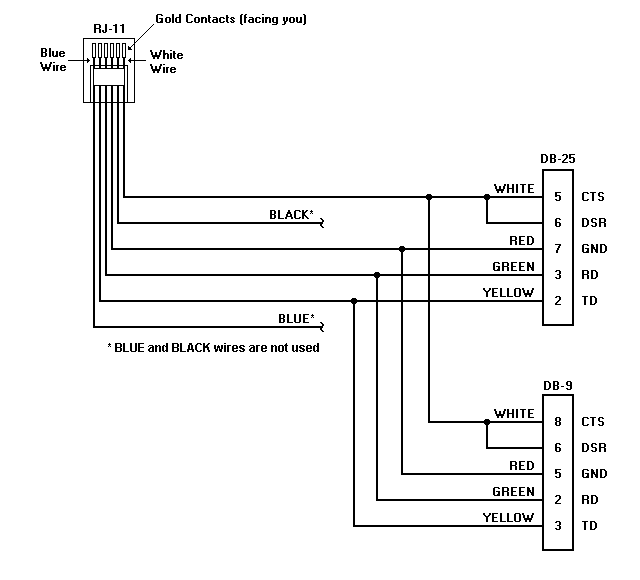
 Figure 1 - Standard SLP Interface Cable
Smart Label Printer 1000, 1000P, 1100
Technical Specification
Revised August 29, 1995
Manul Part Number 22-70014-02
Contents
6. Description of SLP Commands
7. Printer Status Bit Definitions
This document describes the interface for Smart Label Printer models SLP-1000, SLP-1000P, and SLP-1100, including:
The document is intended for programmers who want to control the Smart Label Printer from within an application program, or to interface the printer directly to the host system. It is assumed that the programmer has experience with system-level programming and device control applications. The following specifications are subject to change without notice.
The Smart Label Printer, or SLP, is a very small printer which is dedicated (as the name implies) to printing labels.
Although the SLP hardware is "smart" at what it does (i.e. printing labels), it is actually just a bitmap device. It has no built-in fonts, logic-seeking algorithms, centering logic, blank line detection, etc. It is the application software that provides these "smarts" to the printer system.
The command set is purposely very lean in order to allow the printer to concentrate only on printing and off-load all other functions to the host.
Note: The SLP-1000 printer firmware was in an EPROM and some units have been upgraded. If the EPROM is labeled Version 1.20 or later, the unit is functionally equivalent to the SLP-1000P.
The SLP communicates with the host computer using an RS-232 serial cable. The cable connects the host computer’s TX, RX, CTS, DSR and GND signals to the printer via a standard RJ11 type (modular telephone) connector. The host end of the cable is intended for DTE connections using either a DB-25 or DB-9 connector. Older cables do not include connections for CTS and DSR because the SLP-1000 and SLP-1000P printers do not support hardware handshaking. A cable wiring diagram is shown in Figure 1.
The serial data format is 9600 baud, eight data bits, one stop bit, and no parity. A proprietary busy bit handshake protocol is supported by all three models and, additionally, hardware handshake is supported by the SLP-1100 model.
The primary communication flow is from the host to the SLP. This is because the host must send commands and bitmap data, while the SLP sends only occasional status and handshake data.
Figure 1 - Standard SLP Interface Cable
The printer uses bit 6 in the status byte for handshaking. When the printer's buffer is nearly full (19 bytes left for SLP-1100 or 10 bytes left for other models), a status byte with bit 6 set is sent to the host. When the printer has room in its buffer again, it will send another status byte with bit 6 cleared.
When interfacing with the SLP-1100 printer, we recommend using hardware handshaking because it is usually easier to implement with most operating systems. The hardware handshake uses the host’s CTS and DSR signals to indicate the "busy" status of the printer. These signals are set "false" whenever the printer is busy and "true" when the printer is ready to receive more data.
The printer acknowledges each print command (i.e., CMD_R2L and CMD_L2R) with a special status byte that has bit 7 (STAT_ACK) set. The status byte is sent after all data bytes for the command are received.
When the printer starts processing commands, after sitting idle, it will send a status byte with the STAT_IDLE bit cleared. After all commands and data in the receive buffer have been processed, the printer will send a status byte with the STAT_IDLE bit set.
Since the SLP status byte is normally the only data sent from the printer, the host receive routine can be fairly simple. In general, a newly received status byte can replace the contents of a global status variable. The SLP sends a new status byte, unsolicited, to the host whenever there is a change in its internal copy of the status byte. A status byte can also be requested by sending the CMD_STATUS command to the SLP.
The following table is a comparison of the commands that are recognized by the various SLP models. The mnemonics are defined in the SAMPLE.H file of the SLP Developer's Kit. A check mark (ü ) indicates that the command is available.
|
|
SLP-1000 |
SLP-1000P |
SLP-1100 |
Hex Value |
|
|
CMD_NOP |
ü |
ü |
ü |
00 |
no-operation |
|
CMD_STATUS |
ü |
ü |
ü |
01 |
request printer status |
|
CMD_VERSION |
|
|
ü |
02 |
request firmware version |
|
CMD_L2R |
ü |
ü |
ü |
03 |
print left to right |
|
CMD_R2L |
ü |
ü |
ü |
04 |
print right to left |
|
CMD_HALFSTEP |
|
ü |
ü |
05 |
high resolution half-step mode |
|
CMD_FULLSTEP |
|
ü |
ü |
06 |
normal full step mode |
|
CMD_TABRIGHT |
ü |
ü |
ü |
07 |
tab n dots to right |
|
CMD_TABLEFT |
ü |
ü |
ü |
08 |
tab n dots to left |
|
CMD_HALFDOT |
ü |
ü |
ü |
09 |
move vertically 1/2 dot |
|
CMD_LINEFEED |
ü |
ü |
ü |
0A |
move vertically 8 dots |
|
CMD_VERTTAB |
ü |
ü |
ü |
0B |
move vertically 7.5 dots |
|
CMD_FORMFEED |
ü |
ü |
ü |
0C |
advance label |
|
CMD_RETURN |
ü |
ü |
ü |
0D |
move to left margin |
|
CMD_DENSITY |
ü |
ü |
ü |
0E |
set print density |
|
CMD_RESET |
ü |
ü |
ü |
0F |
reset printer |
|
CMD_CHECK |
|
ü |
ü |
88 |
check for SLP-1000P or SLP-1100 |
CMD_NOP -- no operation
This command is ignored by the SLP. It is used primarily to pad a partially transmitted record when the printer needs to be reset.
CMD_STATUS -- request printer status
This command is used to request the status of the SLP. The printer will respond to this command immediately after it is received (i.e., it is not buffered). It is normally used only at start-up, when the state of the printer is unknown, or when a global status variable is not implemented. See "Status Byte Definitions" below for a description of the status byte.
CMD_VERSION -- request printer firmware version
This command is used to request the version of the SLP-1100 firmware. The printer will respond to this command immediately after it is received (i.e., it is not buffered).
The current version of SLP-1100 firmware returns a value of 21 hex. Values from 22 hex through 2F hex are reserved for future versions. The SLP-1000 and SLP-1000P printers do not recognize this command and will return a status byte with the STAT_COMMAND_ERR bit set.
CMD_L2R -- print left to right
This command is used to send a bitmap record to the printer. The data will be printed from left to right. The command must be followed by the record length (single byte) and the data record.
For example:
|
Byte Sent |
Meaning |
|
03 |
CMD_L2R -- print left to right |
|
05 |
data record length (5 bytes) |
|
01 |
ü |
|
02 |
ï |
|
03 |
ý 5 binary data bytes |
|
04 |
ï |
|
05 |
þ |
The bits of each data byte are translated into an image of eight "dots" (1=black, 0=white), arranged in a vertical column, with the least significant bit as the upper dot.
For example, the command (values in hex):
03 08 11 22 44 88 11 22 44 88
would produce the following pattern:
bit
(top of label)0 n n
1 n n
2 n n
3 n n
4 n n
5 n n
6 n n
7 n n
CMD_R2L -- print right to left
This command is identical to CMD_L2R (above) except that the data will be printed from right to left.
CMD_HALFSTEP -- high resolution half-step mode
This command, used for high resolution printing, causes the print head to move in one-half step increments. This causes the dots to overlap and produces a higher dot density.
CMD_FULLSTEP -- normal full step mode
This command, used for normal resolution printing, causes the print head to move in full step increments. This is the default mode after the printer is reset.
CMD_TABRIGHT -- tab n dots to right
This command is used to move the print head to the right. The distance is determined by the byte sent immediately after the command.
For example:
|
Byte Sent |
Meaning |
|
07 |
CMD_TABRIGHT -- tab to right |
|
05 |
move 5 dots |
CMD_TABLEFT -- tab n dots to left
Identical to CMD_TABRIGHT (above), except that the print head is moved to the left.
CMD_HALFDOT -- move vertically 1/2 dot
Moves the paper up 1/2 dot. May be used to overlap dots in the vertical direction.
CMD_LINEFEED -- move vertically 8 dots
Moves the paper up 8 dots. Commonly used to move the paper after each bitmap record is printed.
CMD_VERTTAB -- move vertically 7.5 dots
Moves the paper up 7 1/2 dots. Normally used in conjunction with CMD_HALFDOT to overlap dots in the vertical direction.
CMD_FORMFEED -- advance label
Moves the paper up to the top of the next label.
CMD_RETURN -- move to left margin "home" position
Moves the print head to the "home" position at the left margin. This is normally used only once before each label is printed and CMD_TABLEFT is used for the remainder of the label.
Is it not recommended to use this command after each bitmap record is printed. This command instructs the hardware to reset the print head using a mechanical limit switch and the final head position may vary slightly, due to mechanical tolerances and gear backlash.
CMD_DENSITY -- set print density
Sets the darkness of the print by defining the amount of time that the head is turned for each dot. The command must be followed by one of the following values:
|
Darkness |
Value |
|
Lightest |
C4 |
|
|
C3 |
|
Medium-light |
C2 |
|
|
C1 |
|
Normal |
80 |
|
|
81 |
|
Medium-dark |
82 |
|
|
83 |
|
Darkest |
84 |
Other values will be ignored by the printer.
CMD_RESET -- reset print
This causes the printer to reset to the equivalent of a power-up state and send a status byte. This command is normally sent only when the state of the printer is unknown (e.g. during initialization of the host driver program) and after an error occurs.
The printer reset cycle takes at least 100 milliseconds (possibly much longer) to complete, and all commands and data received during that time are ignored. For that reason, the driver program should always wait for the response (status byte) before continuing. If no response is received within 3 seconds, it is safe to assume there is a problem.
Note: Even though this command is not normally buffered, it may end up in the buffer if it is sent when the printer is not expecting a command. For example, if the printer receives a CMD_PRINT followed by a record-length parameter of 100, the printer will assume the next 100 bytes are binary data, not commands.
When using interrupt-driven communications, it may be difficult to distinguish commands from data when an immediate reset is desired. In that case, to ensure that the reset command is executed, send a string of CMD_NOPs at least as long as the longest data record before sending the CMD_RESET. This will pad out any partial data records, and extra CMD_NOPs are ignored.
CMD_CHECK -- check for SLP-1000P or SLP-1100 printer
This command is used to detect the SLP-1000P and SLP-1100 printers. The printer will respond by sending a status byte with a value of 77 hex (see STAT_CHECK, defined in SAMPLE.H).
Printers with firmware version 1.12 or earlier communicate at 19,200 baud and will not respond to this command. All newer printers will respond by sending a status byte with a value of 77 hex (defined as STAT_9600 in SAMPLE.H).
The printer will send a status byte to the host whenever it detects an error condition or the printer status changes (i.e., when any status bit changes state). Each of the eight bits in the status byte has a distinct meaning and reflects a specific state of the printer. The mnemonics for the status bits are defined in the table below and in the SAMPLE.H file of the SLP Developer's Kit.
The following status bits indicate that user intervention is required:
STAT_PAPER_OUT STAT_PAPER_JAM STAT_HARD_ERR
When user intervention is required, the printer's LED will blink until the condition is cleared and a new status byte is sent with none of the "intervention required" bits set. The LED will be in a steady "on" state whenever the printer is operating normally and user intervention is not required.
|
|
|
|
Intervention Req'd (LED Flashes) |
|
0 |
STAT_PAPER_OUT |
The printer is out of labels |
Yes |
|
1 |
STAT_PAPER_JAM |
A label is jammed in the printer |
Yes |
|
2 |
STAT_HARD_ERR |
The printer has a hardware problem |
Yes |
|
3 |
STAT_COMM_ERR |
A communications error occurred |
No |
|
4 |
STAT_COMMAND_ERR |
An invalid command was received |
No |
|
5 |
STAT_IDLE |
The printer is idle |
No |
|
6 |
STAT_BUFFER_FULL |
The printer input buffer is almost full |
No |
|
7 |
STAT_ACK |
A complete print record was received |
No |
Status Bit Definitions
STAT_PAPER_OUT
This bit is set immediately after a form feed is executed and a paper out condition is detected. When this bit is set, all print operations are suspended and a status byte is sent to alert the host.
After new paper is successfully loaded, this bit is cleared, a status byte is sent, and print operations are resumed. A reset command is not required to clear this bit (it would flush any pending commands in the input buffer).
STAT_PAPER_JAM
This bit is set when a paper jam is detected. This bit is cleared on printer power-up or when a reset command is received. The paper is considered jammed when more than one and one-half times the form length (default form length is 89mm) is fed without a separator being detected.
STAT_HARD_ERR
This bit is set when a hardware error (e.g., stuck paper sensor, stuck shuttle motor or sensor, etc.). This bit is cleared on printer power-up or when a reset command is received.
STAT_COMM_ERR
This bit is set when the printer detects an I/O or UART error (e.g., break, framing error, buffer overflow, receiver overrun, etc.). It is cleared immediately after the status byte is sent.
STAT_COMMAND_ERR
This bit is set when the printer fetches an invalid command from the input buffer. It is cleared immediately after the status byte is sent.
STAT_IDLE
This bit is set whenever the printer's input buffer is empty, all commands have been executed to completion, and there are no pending commands to process.
STAT_BUFFER_FULL
This bit is set when the printer's input buffer fills to the point where it has less than 10 bytes free (or 20 bytes free for SLP-1100). It is cleared when the input buffer is almost empty and is ready to receive more data. This allows the printer and host to handshake in a manner similar to XON/XOFF, except that the host looks only at this bit for handshaking, not the entire byte.
STAT_ACK
This bit is set when all of the data bytes for a CMD_L2R or CMD_R2L command have been received. It is cleared immediately after the status byte is sent.
Included with this document is a sample program (SAMPLE.C) which is a fully functional SLP driver program. However, in the interest of clarity and simplicity, it is a "bare-bones"driver designed mainly for illustrative purposes. The code should be easily portable to other environments and will run as-is on an IBM PC or compatible.
The files required for SAMPLE are:
SAMPLE.C main code module
SAMPLE.H include file for above
FONT0001.SLP Standard 12 font file
FONT1011.SLP Venice 23M Cond font file
FONT8290.SLP POSTNET font file
The sample program provides an example of how to interface to the SLP and may be used as the basis for many applications. Here are some additional considerations for writing a driver: